
Escaping the Convenience Trap
It takes less than five seconds to make a mistake that could cost you your entire life savings. You set up your new hardware wallet, write down the 12 or 24 words, and then—seeking a moment of convenience—you snap a quick photo of the paper “just in case.” Or perhaps you type it into a secure note on your phone to access it later.
In that fleeting moment, you have violated the cardinal rule of self-custody: Never Go Digital.
The transition from traditional banking to self-sovereignty requires a mental shift. In the traditional world, digital backups are good practice. In crypto, digital convenience is the enemy of security. Once your seed phrase touches a lens, a keyboard, or a cloud server, it ceases to be a cold key and becomes a hot target.
The “Digital Dumpster” Effect
Why is digital storage so dangerous? It isn’t just about a hacker guessing your password. The threat landscape has evolved into automated, industrial-scale extraction.
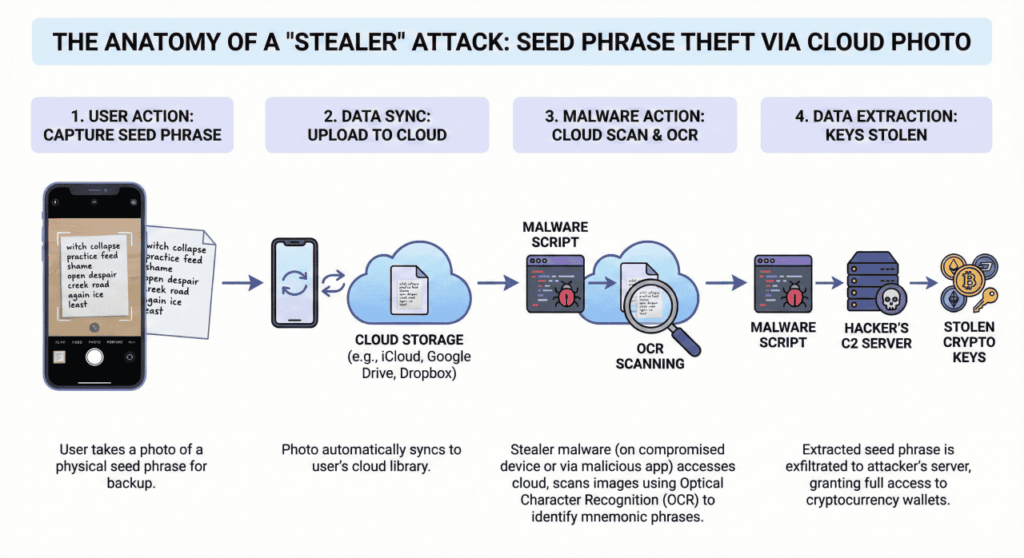
When you store a seed phrase on an internet-connected device, you are effectively placing it in a “Digital Dumpster” that hackers scour using automated scripts known as Stealer Malware. These programs run silently in the background, often hitching a ride on cracked software or innocent-looking browser extensions. They don’t need to control your computer manually; they simply sweep for specific data types:
- Clipboard Hijacking: Malware monitors your clipboard. If you copy and paste a seed phrase, the script captures it instantly.
- OCR Scanning: AI-driven tools can scan your photo gallery, “reading” the text in your screenshots to identify the specific pattern of BIP-39 seed words.
- Chat Log Scraping: “Saved Messages” in Telegram, Discord, or Slack are prime targets for automated scrapers looking for pinned passwords.
Objection: “But I Use an Encrypted Password Manager”
A common counter-argument is the reliance on high-end password managers. Users often ask, “If my password manager uses AES-256 encryption, isn’t that safe?”
While password managers are excellent for Netflix logins or banking passwords (which have reset buttons), they are catastrophic for seed phrases. Storing your seed in a password manager concentrates your risk into a single point of failure.
If the service provider suffers a breach—as seen in the 2022 LastPass incident—your vault is exposed. Even if the encryption holds, you are now betting your financial future on the hope that your master password is strong enough to withstand brute-force attacks on the hacker’s local server.
Furthermore, “Zero-Click” malware poses a threat that encryption cannot solve. If your operating system is compromised by a keystroke logger, the attacker captures your master password as you type it. Once the vault is unlocked, the seed phrase is visible in plain text on your screen, ready to be captured.
True cold storage means the words never exist on a networked device. You cannot hack a piece of steel hidden inside a wall.
Actionable Tip: The Analog Gap
To ensure your seed phrase is safe, there must be an “Analog Gap” between the generation of the key and the storage of the key. The words should move from the hardware wallet screen directly to a physical medium (paper or metal) without ever passing through a camera lens, keyboard, or printer.
The Solution: Mechanical Encoding
If digital is dangerous and paper is fragile (susceptible to fire and flood), what is the alternative?
The industry standard is moving toward Mechanical Encoding on stainless steel. However, simply etching words onto metal can be messy and prone to human error. A more robust approach, utilized by systems like KryptoDots, replaces written words with a coordinate system.
How Mechanical Encoding Works
This method relies on a “Zero-Tech” approach to bulletproof your backup:
- Look-Up: You use a BIP-39 word list booklet to find the corresponding 4-digit ID number for each of your seed words.
- Mark: You place a template over a stainless steel plate.
- Punch: Using a center-punch tool, you strike the steel to create a permanent indentation at the specific coordinate.
Why This is Superior
- Privacy through Obscurity: To an untrained observer or a thief ransacking a house, a plate covered in dots looks like an industrial spare part or a random piece of metal. It does not scream “Bitcoin inside” the way a list of words does.
- Precision: Freehand engraving is difficult. Punching a specific dot on a grid is binary—it’s either there or it isn’t. This eliminates the risk of bad handwriting making your backup illegible years later.
- Durability: 304-grade stainless steel is immune to magnetic fields, salt water corrosion, and house fires reaching 1400°C (2552°F).

The “Digital Detox” Checklist
If you suspect you have ever digitized your seed phrase, you must act now. Treat your current wallet as compromised and move your funds to a new, secure wallet.
Follow this protocol to secure your future:
- Audit your photos: Scroll through your phone’s gallery and “Hidden” folders. Delete any photos of seed phrases.
- Check the cloud: Ensure those photos didn’t auto-sync to iCloud or Google Photos. Check the “Trash” folder in the cloud, as files often linger there for 30 days.
- Clear the clipboard: If you use a software wallet, never copy/paste the seed words.
- Purge notes apps: Search your notes for “seed,” “crypto,” or “recovery” and delete any text files containing keys.
- Create a Physical Backup: Move your seed phrase to a steel solution using mechanical encoding for permanence.
The Takeaway: Hackers are opportunistic predators. If you leave a digital scent, they will track it. By keeping your seed phrase strictly physical, you render their sophisticated digital tools useless.
Leave a Reply